Problem Identification
People buy dozens of products over time — each comes with a warranty card, a receipt, and a different claim process. When something breaks, the receipt is lost, the warranty period is unclear, and the claim process feels like a maze.
View Project
Problems Found
Problem 1 — Zero Motivation at Purchase Time |
When someone buys a product, they're excited about the product — not about filing warranty paperwork. The mental model is 'I'll deal with it if something breaks.' Nobody thinks about warranty until something breaks. By then it's too late.
Problem 2 — The 'Where Did I Put It' Panic |
When something breaks, the user enters panic mode — scrambling through WhatsApp, old emails, physical drawers, and Google Photos. The information exists somewhere, it's just scattered across 6 different places. No single source of truth.
Problem 3 — Warranty Status is Invisible ★ Selected |
Most people have no idea which of their products are currently under warranty. They assume things are expired when they're not, or vice versa. Warranty status is never surfaced unless you go looking for it — and nobody goes looking.
Problem 4 — Claiming is a Black Box ★ Selected |
Even when people know they have a valid warranty, the claim process stops them cold. Do I call the brand or the retailer? Do I need the original box? Is this covered? People give up on valid claims not because they lack warranty — but because the process feels overwhelming.
Problem 5 — The Silent Expiry ★ Selected |
Warranties expire quietly. Nobody sends a reminder. One day you're covered, the next you're not — and you never knew the window was closing. A user could have gotten a free repair in March. It's now May. They just paid ₹4,500 for it.
Why Problems 3, 4 & 5
These three problems are not separate — they form a sequence:
Problem 3 Warranty status is invisible "I didn't know" | Problem 5 Silent expiry catches them off guard "I didn't know it was expiring" | Problem 4 Claiming is a black box "I don't know what to do now" |
This is literally one user journey — from unawareness → panic → helplessness. A single well-designed flow can address all three.
Problem Statement
Users with valid warranties miss their window to claim — either because they didn't know it was expiring, or because when something breaks they don't know how to navigate the claim process. The result: they pay out of pocket for repairs they were entitled to for free.
02. Directions Explored
Before jumping into screens, I explored three distinct design directions. Each addresses the same core problems but from a different angle.
Direction | Strength | Weakness / Why Not |
A — Dashboard First | Addresses awareness constantly, not just at crisis moment. | Passive — user has to open the app to benefit. No proactive value. |
B — Notification Driven ✓ Chosen | Catches user at the right moment without them having to remember. Highest emotional stakes. | Combined with Dashboard (A) for both proactive and reactive users. |
C — Break-Fix Flow | Serves the highest-stress, highest-stakes moment. Good for Problem 4. | Purely reactive. Doesn't address the silent expiry problem at all. |
03. The Chosen Solution
I combined Directions A and B into one cohesive system. The dashboard and notification are two entry points to the same journey — because real users come to apps in two different mindsets.
Two Entry Points, One Flow
Entry A — Proactive User Opens app → sees bell badge → taps bell → Notification Centre → Product Detail → Claim | Entry B — Notification Triggered Receives push notification on lock screen → taps → Product Detail → Claim |
Flow Diagram
Lock Screen Notif → Dashboard (Bell Badge) → Notification Centre → Product Detail → Claim Options → Confirmation
04. Final Screens
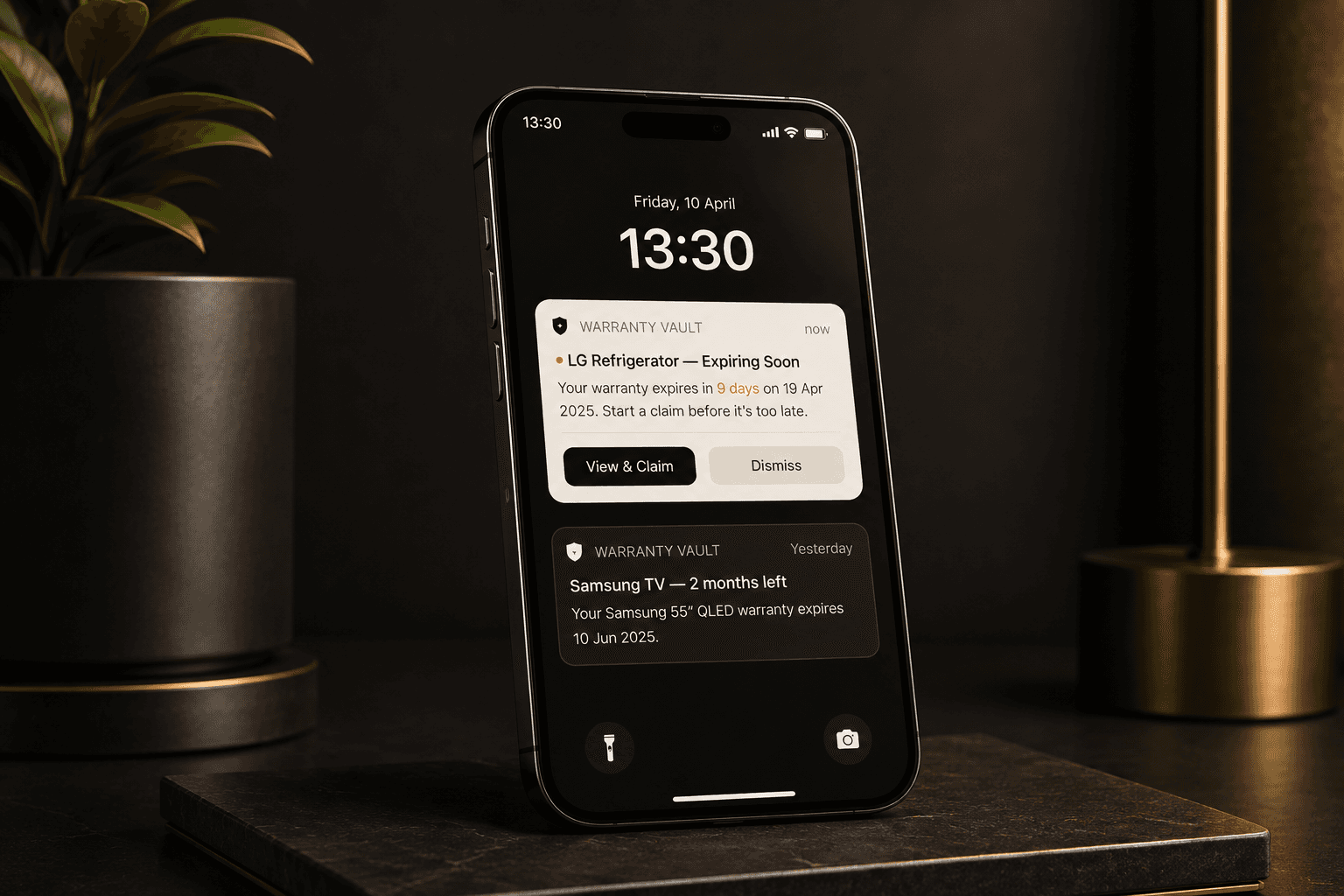
Screen 1 — Lock Screen Notification
The first touchpoint. A push notification appears on the user's lock screen with the product name, days remaining, and two clear actions: View & Claim or Dismiss.
• Warm amber highlight draws the eye to the urgent item
• Two-action layout — primary CTA and a clear dismiss option
• Secondary notification shows Samsung TV expiry context
Screen 2 — Dashboard with Bell Icon
The home screen. Bell icon sits top-right with a red badge (1 unread). Products are grouped by urgency: Expiring Soon → Active → Expired. Each card has a timeline bar showing warranty consumed vs. remaining.

• Bell icon top-right with red badge — consistent with platform conventions
• Summary pills: 4 Active · 1 Expiring · 1 Expired — quick status at a glance
• Expiring card floats to the top with amber border and direct claim CTA
• Timeline bars give instant visual sense of how much warranty remains
• Expired products are de-emphasised with reduced opacity
Screen 2B — Notification Centre
Opens when the user taps the bell icon. All warranty-related alerts in one place — unread items highlighted, with inline CTAs on urgent items so the user can act without navigating away.
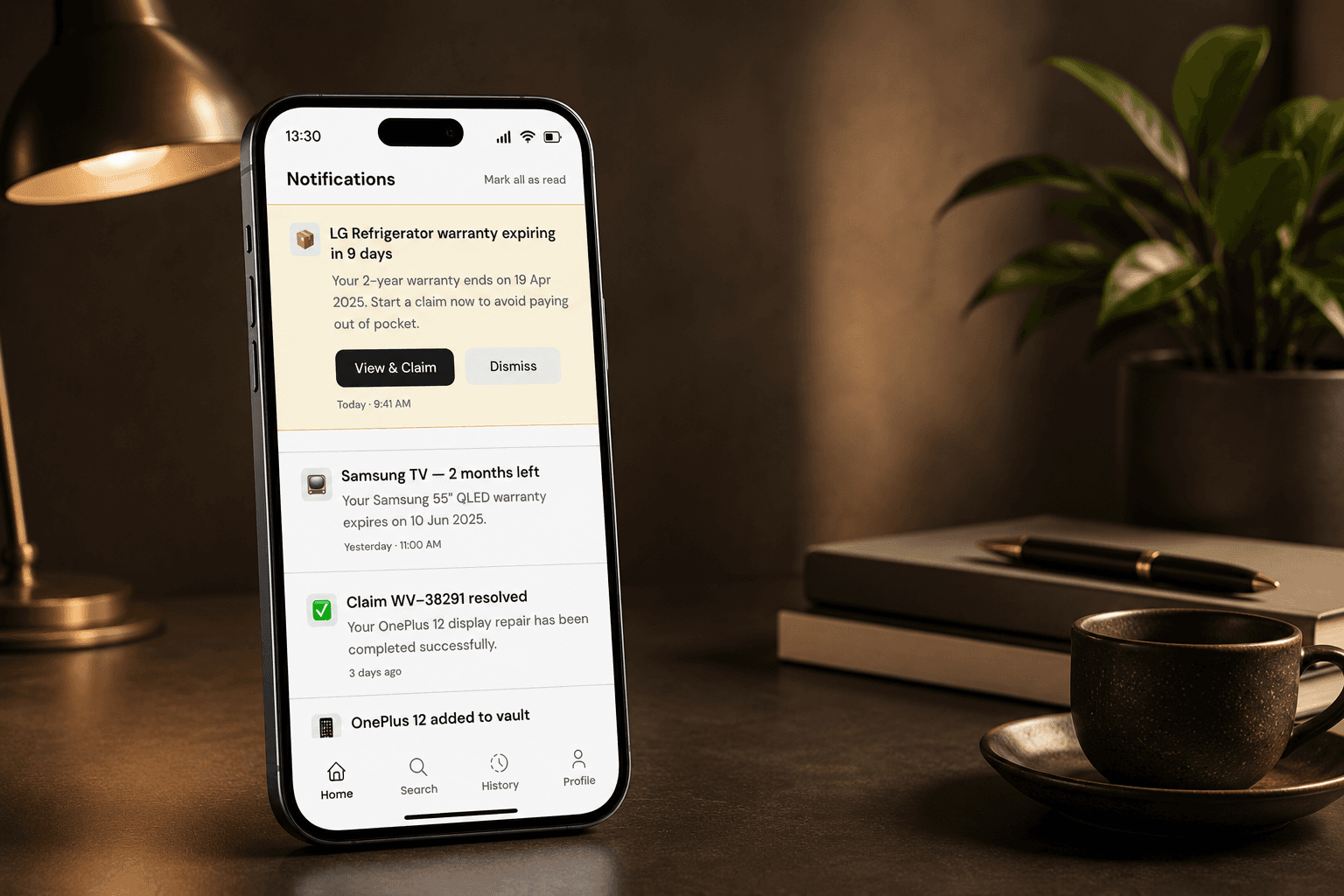
• Unread LG Fridge alert highlighted with amber background + red unread dot
• View & Claim and Dismiss CTAs embedded directly inside the notification item
• Past notifications (Samsung TV warning, resolved claim) provide context
• Mark all as read option top-right for quick housekeeping
Screen 3 — Product Detail
Full warranty information for the selected product. Includes days remaining, start/expiry dates, warranty coverage timeline, attached documents, and claim entry point.
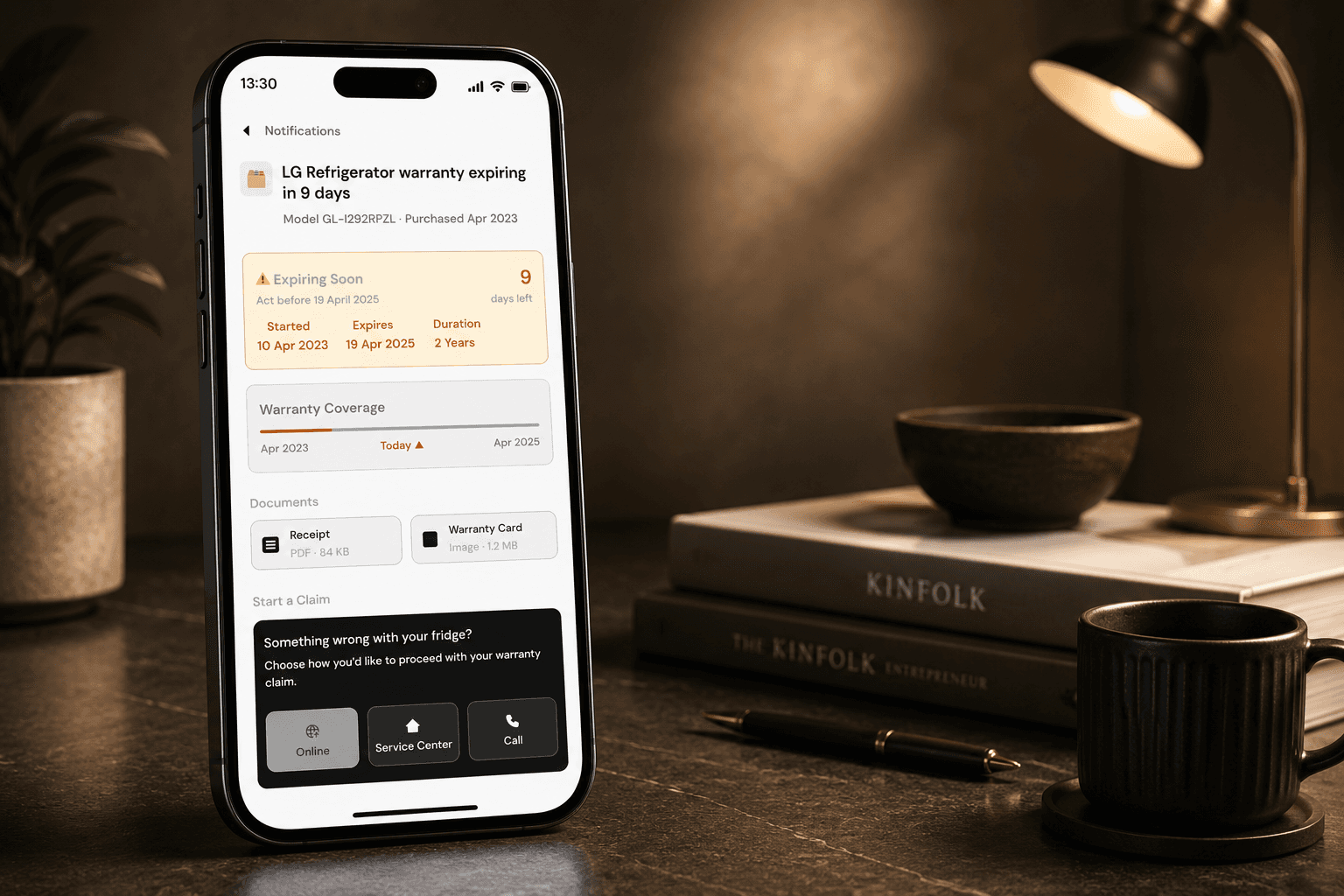
• Amber status card immediately communicates urgency — 9 days left
• Coverage timeline bar shows visually how close to expiry the product is
• Documents (Receipt + Warranty Card) accessible with one tap — no digging
• Claim entry section at the bottom with three paths: Online, Service Center, Call
• Continue with Online Claim CTA anchored at the bottom for easy access
Screen 4— Claim Confirmation
The final screen after a claim is submitted. Dark hero section with a check mark and reference number. A step-by-step tracker shows what happens next, reducing post-submission anxiety.
• Dark hero with animated check mark signals clear success
• Claim reference number WV-49021 prominently displayed for follow-up
• What happens next tracker — reduces post-submission anxiety
• Track My Claim CTA keeps user engaged; Back to Home for closure
05. Assumptions Made
• Users have already added their products to the app (onboarding flow not designed in this submission).
• Warranty data (start date, duration, product model) is either entered manually or captured via receipt scan at the time of adding a product.
• Documents (receipt, warranty card) are uploaded by the user at the time of product addition and stored securely.
• The claim initiation connects to the brand's support API or redirects to their official claim portal.
• 'Online Claim' is the default and most common path — service center and call are secondary options.
06. Ideas Considered but Not Picked
Receipt Scan Onboarding
Adding a product by scanning a receipt using OCR. Strong idea — reduces friction at the point of capture. Not chosen because it belongs to the onboarding flow, not the core tracking/claiming flow. Worth designing as a follow-up.
Warranty Health Score
A single number or ring chart showing overall 'warranty health' across all products. Visually appealing but adds cognitive load without direct action. Users need to act, not just feel informed.
WhatsApp / Email Reminder Integration
Sending reminders via WhatsApp or email instead of push notifications. Reduces dependency on the app being installed. Not chosen because it complicates the flow and moves users away from the in-app claim journey.


